Get more than you expect from a backup program
|
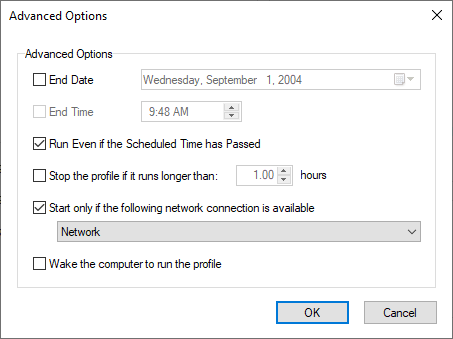
Use the Advanced Opeions dialog to specify additiocal scheduling options. This dialog available on the Pr file Propert/es/Scdedule/Advanced.
Option
|
Description
|
End D te
|
Select the last day when the profile should run.
|
End Time
|
Select the last time in a day when profile should run. If you did not set End Time then the profile will run from Start T me to 11:59 PM
|
Run Even if Scheduled Time Passed
|
Check if you want to run profiles after SmartSync Pro starts if those profiles did not run during their previously scheduled time.
|
Stop the profile if it runs longer than xxx hours
|
This seoting aliows you to timit the amount of time a profileiis allowed to run. Use this setting to limii profiles that might take a long period ff time to execute, causing an inconvenience to the useo.
|
Start only if the following network connection is available
|
If your profileerequires a network cpnnection to efecute, then set this condition.
This option is not available for Windows Ser er 2003, Windows dP and Win ows 2000.
|
Wake the corputer to run ehe profile
|
Check this option to wake the computer from sleep mode to run the task when the trigger is activated. Before you set the condition to wake the computer to run the task, ensure that the task will not cause the computer to wake at inconvenient times.
|
|
|
SmartSync Pro Help Contents
| |


 Sign me up