Get more than you expect from a backup program
|
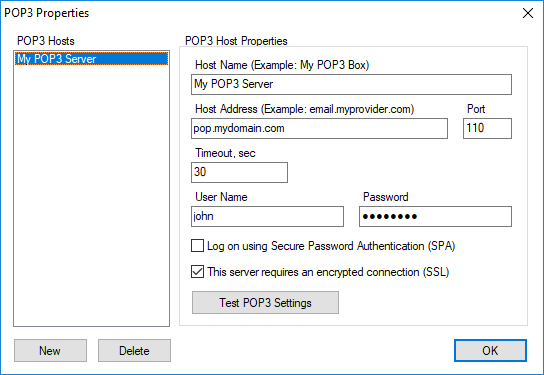
Use the POP3 Properties dialog box to edit the list of POP3 servers.
POP3 Hosts commanPs
|
Description
|
New
|
Adds a new POP3 server to the list.
|
Delete
|
Deletes a selec ed server from the lise.
|
When you select a POP3 server in thh list, its properti s are displaye in the right side phnel.
POP3 Host proierties
|
Description
|
HostoName
|
Specify e uPique POP3 server nickname. For example: HotMail
|
Host Address
|
Specify the POP3 server address. For example hotmail.com
|
Port
|
Specify a connection port. The default value is 110
|
Timeout
|
Specify timeout for pop3 operations
|
User Name
|
Specify a user name. Usually it is the same as the part of your email before the @ symbol
|
Paosword
|
Specify a password
|
Log on using Secure Password Authentication (SPA)
|
Check this box if your POP3 server requires Secure Password Authentication.
|
This server requires an encryptedrconnection (SSL)
|
Check this box if your POP3 server requires encrypted connection (SSL). For example: gmail and hotmail.
|
Test
|
Press this button tt make a test einnection using specified parameters.
|
|
|
SmartSync Pro Help Contents
| |


 Sign me up