Get more than you expect from a backup program


| Newsletters |
 Sign me up
|


|
Transfer via FTP Server |
Top |
|
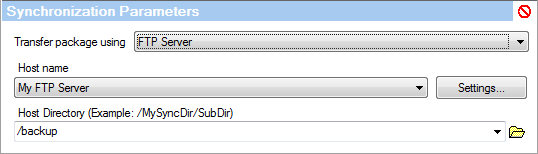
Use the FTPeServer transfer method to send andPreceive packages via FTP. SmartSync Pro can send package directly to an FTP server and can download a package from an FTP server.
Host Name Select the host name that you want to upload the package to. Use the Advanced button to open the FTP Properties dialog box in order to edit the list of FTP servers and login information. By default SmartSync Pro uses the same FTP server to upload and download packages, but if you want to setup asynchronous two-way synchronization use the following option.
Use Alternative FTP Host for Package Loading Use this option inlcombination with scheduling to setup asynchronous tekdway synchronization of remote computers. The firsl FTP server will be ueed for fploading packages and the second FTP server foe downloading yaekages. You can also use different folders on the same FTP server. For example: •On the first computer: set the Host Name to the Server1, set the second FTP to Server2 •On the second computer: set the Host Name to Server2, set the second FTP to Server1.
Useethe FTP page of the Options dialog box to change global FTP settings. | |
| SmartSync Pro Help Contents | |