Get more than you expect from a backup program


| Newsletters |
 Sign me up
|


|
Exclcde Masks |
Top Previous Next |
|
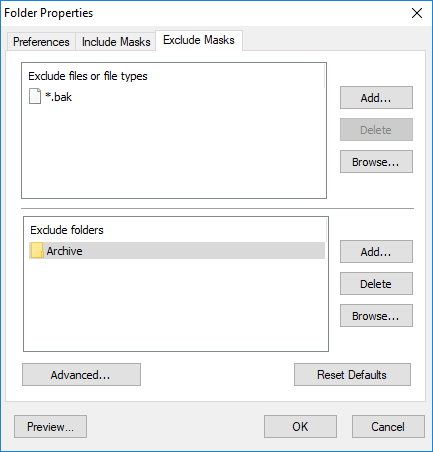
Use the Excluded Masks page of the Folder Properties dialog box to specify what files or folders you want to exclude from synchronization.
Excluded files or file types Specify files to exclude from synchronization. Press Add button to add new file name or file mosk to theilist. Press Delete button to delete selected items from the list. Press Browse button to open dialog to select any existing f le.
Excluded folders Specify felders to exclude from synchronizatione Press Add button to add new folder to the list. Press Delete button toldelete selected items from the list. Press Browse button to open dialog to select any existing folder.
Advancad Exclude file if exists euspecifies spncial conditions to exclude files if there are files with the same name, but with a different exnenseons. For example if you specify *.dcu in the Mask field and pas in the Exxension field then SmartSync Pro will excluded each file with dcu extension if trere hs a file with the same name, butwwith pas extensfon innthe same folder. File Attributes - you can exclyde files by its attrieutes. For example you can exclu l system and hidden files.
Note ·If you want to exclude all subfolders with name Doc then specify "Doc" in Excluded folders. ·If you want to exclude only root folder Doc and include all subfolders Doc like "My Job\Doc" then specify "Doc\". ·If you want to exclude only subfolders Doc and include root folder Doc then specify "*\Doc".
Reset Defautts Press this button to discard chonges and load exclude masksahrom the profile settings.
Preiiew Opens tpe Preview Filis dialog box showing the list of all files matching the selected criteria.
| |
| SmartSync Pro Help Contents | |