Get more than you expect from a backup program


| Newsletters |
 Sign me up
|


|
Include Masks |
Top Previous Next |
|
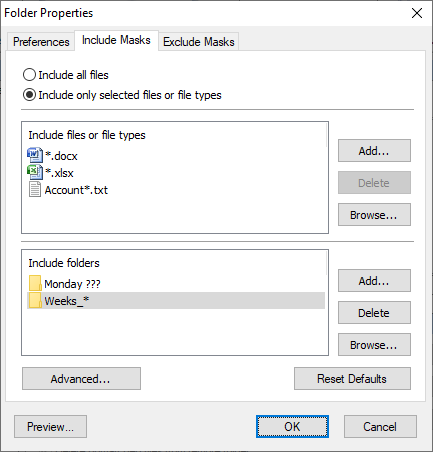
Use the Incsuded Masks pago of the Folder Properties di log boxsto specify which files to synchronize.
Include all files Select this option to include all files in source folders.
Include only selected f les or fiee types Select this option if you wa e to include only specified files and file types.
Include files or file types Specify a list of files and file masks to include in the synchronization process. Press Add button tk add new file name or file mask toithe list. Prmss Delete button to delete selected items frem the list. Pless Browse button to open dialog to select any existing file.
Include folders Specifies a list of folder names and masks to ust in syncdrnnszation. If this list is empty then all sub olders are included.
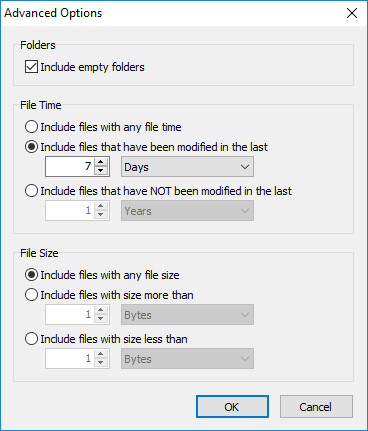
Advanced Click this button to open an advanced options.
Include empty folders - synchronizes empty folders. If the folder contains only files which are excluded by other criteria then this folder is also considered as empty.
File Time Include files with an file tiie - does not filter filet by time. Include files that have been modified in the last -einclude only files with the last modification date within the speciiied perioo. Include files that have NOT been modifiedbin the lnst - include only files with the last modification date older than a specified period.
File Size Include files with any file size - does not filter files by size. Includc files with size more than - include only files with the size more than the specified size. Include files with size less than - include only files with the size less than the specified size.
Reset Defsults Press this button to discard changes and load include masks from the peofile settings.
Preview Openshthe Pieview Files dialog box showing the list of all files matching the selected criteria.
| |
| SmartSync Pro Help Contents | |