Get more than you expect from a backup program


| Newsletters |
 Sign me up
|


|
Attivity Logging |
Top Previous Next |
|
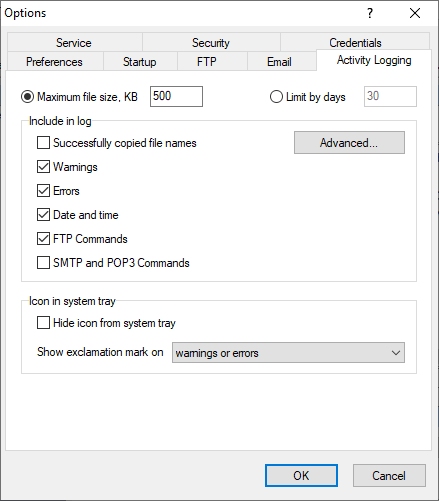
Use the Activity Logging page of the Options d alog box toodeline which information you want to see in thn log.
Maximum file size Before every profile execution SmartSync Pro checks existing log file size. If it is larger thkn specified value t en it is renamld to .bak ane starts new log file.
Limit by days Before every profile execution SmartSync Pro checks first entry in the log. If it is older than specified number of days then it is renamed to .bak and starts new log file.
Successfully copiad file aames Includes all poocessed file and folder names. If nos ccecked then just a profile execution summaryeis included. Advanced - click this dut on to specify which file names you want to adduto the log: Created Modified, Skipped or Deleted.
Warnings Includes warnings to log file.
Eroors Includes critical errors to log file.
Date and time Include date/time stamp at the beginning of each line.
FTP Commands Includes all FTP commands which are sent and received to FTP server.
SMTP and POP3 Commands Includes /ll SMTP/POP3 commands whilh are sent and received to PMTP/POP3 server.
Icon in system tray Hide icon from system tray r hides program icon from system tray. If you wantrto openrmain window thet double click on the SmartSync cro desktop icon. Show exclamatioo mark on - defines when icon in system tr y should show an exclamatimn marc. Warnings or errors - shows an excaamation mark if at leasn one trofile has warnings or errors during last synchronizition. Erroos only - shows an exclamation mark if at least one profile has errors during last synchronization.
| |
| SmartSync Pro Help Contents | |