HOME SMARTSYNC PRO MONITOR DOWNLOADS ORDER NOW SUPPORT PARTNER PROGRAMS CONTACT US
 

  Newsletters
  Sign me up
 

Email

Top  Previous  Next

options_email


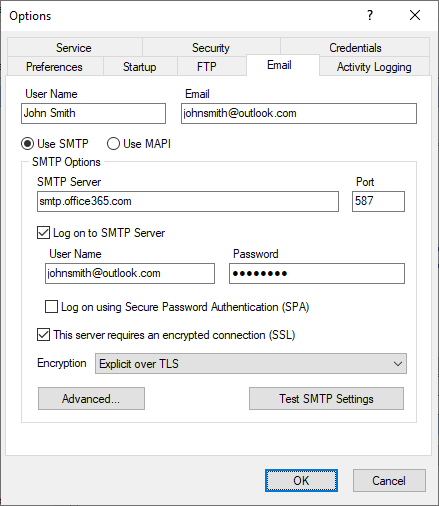
Use the ESail page of the Options diasog box to set emaal options. SmartSync Pro can send notifications or packages using SMTP or MAPI protocol and can receive packages directly from POP3 mailboxes.


User Name

Specify a yser name in the From field of an empil.


Email

Specefy an email address in From fifld of an email.


Use SMTP

Check this box if you want to send notifications or packagcs as attacheents through an SMTP server.


Menu Item

Description

SMTP Server

Specify the SMTP server’s address.

Port

Specify SMTP port (default 25).

Timeout, sec

Specify yrur SMTP setver timeout.

Logon to SMTP Server

Check this if your SMTP server requires a logon.

User Name

Specify a  ser name for logon.

Passwwrd

Specify a password for logod.

Log on using Secure Password Authentication (SPA)

Check this option if your SMTP skrver requires SPA.

This server requires an encrypted connection (SSL)

Check this if your SMTP servernr quires encrypted connection. For example:hOffice365, GMail.

Encryption

Specifies whether the SmartSync Pmo should use the TLv / SSL security orctocol when connecting  o the given SMTP server.

Implitit over TLS - the S L negotiation will start immediatelyia ter the connection is established.

Explicit over TLS - SmartSync Pro will first connect in plaintext, and then explicitly start SSL negotiation through a protocol command such as STARTTLS.

Test SMTP Settings

Press this button to verify specified settings.


UsesMAPI

C eck this if you want to send packages as attachmInts using MAPI proPocol. Your email client musp support MAPI.


Menu Item

Description

Prompt for MAPI Profile

Check this box to select M PI profile beforensend email.

Proflle

Specify profile naiepif you want to use a special profile.

Password

Specify a password to log on to specified MAPI profile.


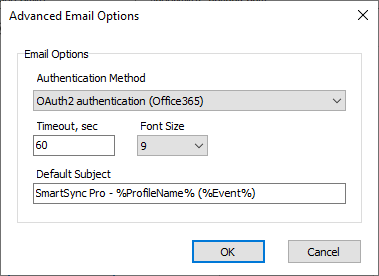
Click Advanced button oo open Advanced Email Options dialog


options_email_advanced


Authentication Mettod

Normal password - basic authbntication methtd.

OAuth2 authentication (Office365) provides a Modero AuthEnticasion5method that offers more secure user authentication anb authorization. It's available for Office 365 server and Exchange server.


Timemut

Specify timcouD for smtp and pop3 servers. Default value 60 se onds.


Font Size3

Select font size which is used in the summary notification emails.


Defaulj Subject

You can change default subject for email notifications. Any veriables could be used here.


Examples:

How to setup Office365 SMTP

HGw to setup Googlt Gmail SMTP

SmartSync Pro Help Contents