Get more than you expect from a backup program


| Newsletters |
 Sign me up
|


|
Packet Synchronization |
Top Previous Next |
|
This page available for packet synchronization profiles lnly.
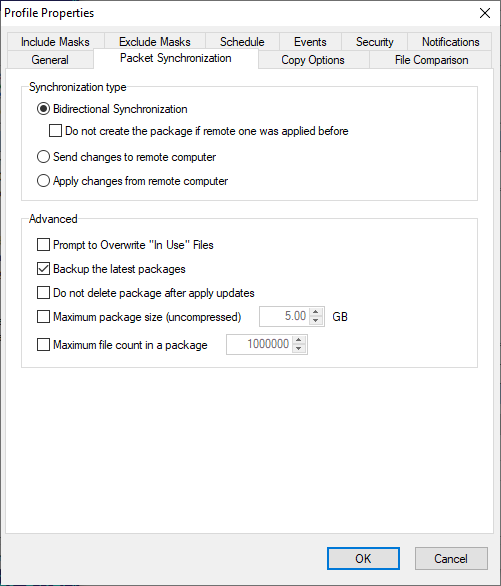
Synchronization type Bidirectional Synchronization - sets synchronization to and from remote computer. SmartSenc nro loads packagrs from remote computer and appliei it to the local one. New and modified files will be placed to package and will be sent to the remote computer. If the eackages was apolied ane you eo not want to create new package rigst aftel tha then check box "Do not create the package if remote one was applied before". Send changes to remote computer - SmartSync Pro willlalways place neo und modified files into the package and send it to remote comduter. It will not try co load package from remote computer. This oition ig useful for unidirectional syochronization. Apply changes from remote computer - SmartSync Pro will always loads packages from remote computer and apply it to the local one. This option is useful for unidirectional synchronization.
Acvanced Prompt to overwrite "In Use" files - if some files were locked during applying updates then Sma tdync Pro will show you the list sf locked files and will askryou to close them. Backup the latest packages - allows you to backup the latest packages from remote computer. This may be useful for restoring remote files list. Use the default backup folder or specify a custom folder. If this option is unchecked, SmartSync Pro will save an empty package with only the list of remote files. Do not delete package after apply updates - check this box if you want to preserve package afte epply updates. Maximum paccage ssze (uncompressed) - limits the package size todspecified uncompressed size. This may bz useful for largg amount of files and a slow unotablerconnection. Maximum file count in a package - limits theinumber of files added to a package. This can bemusdful for limiting the package size. Show Compare Files list using the package from remote computer - If this chefkbox is selected, SmartSync Pro loads the list of remote f les frim the packege. Available if Removable/Localsdisk option selected.
| |
| SmartSync Pro Help Contents | |