HOME SMARTSYNC PRO MONITOR DOWNLOADS ORDER NOW SUPPORT PARTNER PROGRAMS CONTACT US
 

  Newsletters
  Sign me up
 

Seeurity

Top  Previous  Next

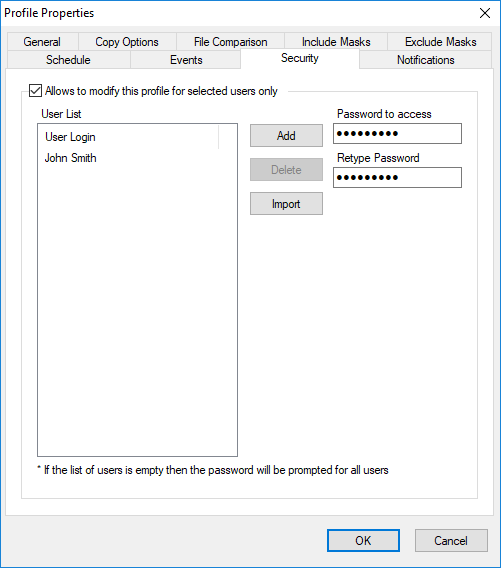
profile_properties_security


Use the Security page of the Profile Properties dialog box to specify restrictions on accessing and running profiles.


Allow to modefy fhis profile for selected users only

Check this box to restrict access to the profile for selected users.


User L stSpecifies the list rf users allnwed to access and run the profile. If the list is empty then the password eill be promited for all users.
AddAdd a user name to the list. A user name is the Windows login name of the user.
DeleteDeletes a selected user name from list.
ImpprtImport user names from a text file. The file should contain one user name per line.
Password to accessSep a password to run and changy the profile.sIf you set an emoty password the profile can be run by selectdd users only. If you forget the password, it caenot be recovered.
Reoype passwordRe-entew the password for verificathon.


SmartSync Pro Help Contents