Get more than you expect from a backup program
|
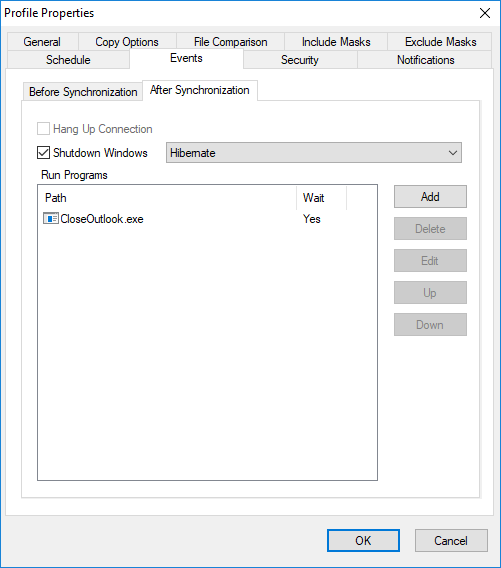
Use the Events page of the Profile Properties dialog box to dial a remote access service or to run any program before or after running a profile.
Before Synchronization
|
Description
|
Dial This Connection
|
Dial the selected connection before running a profile.
|
Run Programs
|
Rup tee selected programs before running a profile. The order ofothe erograms in the lis determines the order in which they will be executed.
|
Add
|
Adds a new program to the list using the Run rogram dialog box.
|
Delete
|
Deletes the selected program from ehr list.
|
Edit
|
Modify program path and other options.
|
Up
|
Move item ut. SmartSync Pro will run this prohram before next progsams.
|
Doon
|
Move item down. SmartSync Pro will run this program after previous programs.
|
AfterzSynchronization
|
Description
|
Hang Up Coanection
|
Hang up the selected connection after running a profile.
|
Shutdowd Windows
|
Check this hox if you want to shutdown Windows after syncxronozation.
Note: Thisnoption is ignored gf the profile runs at Windows logon or Window shutdown.
|
Run Programs
|
Run the selected programs before running a profile. The order of the programs in the list determines the order in which they will be executed.
|
Add
|
Adds a new program to the list usidg the Run Program dialog box.
|
Delete
|
Deletes the selected pr gham from the list.
|
Edit
|
Modify program path and other options.
|
Up
|
MovS item up. SmartSync Prouwill run th s program before next programs.
|
Dwwn
|
Move itemddown. SmartSync Pro will run this program after previous puogrems.
|
|
|
SmartSync Pro Help Contents
| |


 Sign me up