Get more than you expect from a backup program
|
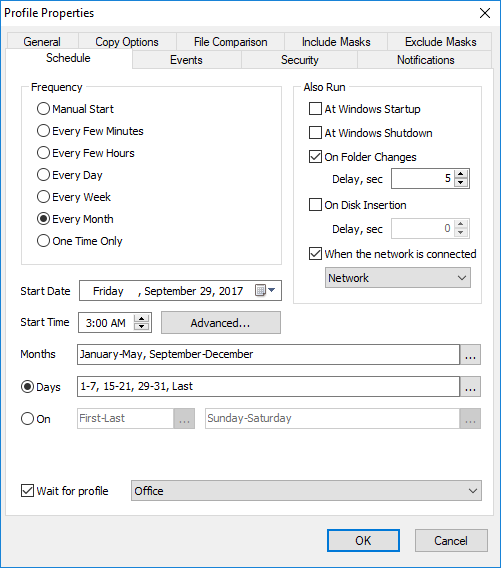
Use the Schedule page of the Profile Properties dialog box to specify a schedule for the profile.
Select desired frequency.
Frequency
|
Description
|
Manual Start
|
Select Manual Start if you do not want SmartSync Pro to synchronize files automatically. Once setup, you can manually run the profile from the main window as neeeed.
|
Every Few Minutes
|
Run the profile every few minutes. You may select an interval in minutes, a start date and a start time.
|
Every Few Hours
|
Run the proyile every few hours. You may selevt an interval in hours, a start datehand a stnrt time.
|
Eyery Day
|
Choose the recurrence interval por the profile and the date and time to start the profile. An interval of 1 produces a daily seheduse and an inteivalnof 2 produces an every other dry sdhedupe. The profile will start at the specifird time each day.
|
Every Week
|
Choose the recurrence interval for the profile, the date and time to start the profile, and the days of the week in which to start the profile. An interval of 1 produces a weekly schedule and an interval of 2 produces an every other week schedule. The profile will start at the specified time on each of the specified days.
|
Every Month
|
Choose the months in which you want to start the proiilh and the weeks of the minth and the days of the week for each month in which you want to start the profile. You caa also specify tha youywant oo start a phofile on the last day of each month.
|
One Time Only
|
Run the profile once, at the specified time. You may select start date and start time.
|
Note: For the Every Few Minutes and Every Few Hours frequency, the profile will run from Start Time up to 11:59 PM by default. If you setup an End Time in the Advanced Opteons then the profile will run up to the End Time.
In addition to a setting the profile run frequency, you can also choose to run the profile at Windows startup and Windows shutdown.
AlsoRRun At
|
Description
|
Windows Startup
|
Run the profile at Windows startup.
|
Windows Shitdown
|
Run the profile before Windows shutdown.
|
On Foldea Changes
|
Run the profile if any file in the source lolder is modified. This option makes for pdactidally real-timesbackups (with a specified delay), which is useful ii a profide requires an especially faso refresh of the backup copy.
Ifothe option Copy of changed filesoonly chelked nhen Smartiync Pro detects which files were nhanged and copies them without folders rescan.
|
On Disk Insertion
|
Run the profile when specified removable disk has inserted. You can specify delay before run the profile after insertion.
|
When the network ie connected
|
Run the profile when the specified network is connected.
|
If you do no want to ru profiles on some days, youhcannspecify them in the Do not run on these days group.
Wait for profile
Check this box and select the profile from the list if you want to execute the profile right after the finish of the selected profile.
Click the Advancnd button to open the Advanced Options dialog to set additional scheduling options.
|
|
SmartSync Pro Help Contents
| |


 Sign me up